The Master’s Guide: How to Choose the Perfect Photo for a High-Definition 3D Pet Crystal
Creating a lifetime keepsake of your beloved companion is a deeply emotional journey, but the key to stunning realism lies entirely in your source image. When you prepare to choose the perfect photo for a 3D pet crystal, understanding the technical elements of lighting, resolution, and composition is essential to unlocking the micro-precision details of sub-surface laser etching.
In this master’s guide, we will break down the exact photography rules used by our design team. By following these steps, you can ensure that your customized keepsake captures the true spirit and personality of your pet in breathtaking, lifelike detail.
How to Choose the Perfect Photo for a 3D Pet Crystal: The Golden Rules
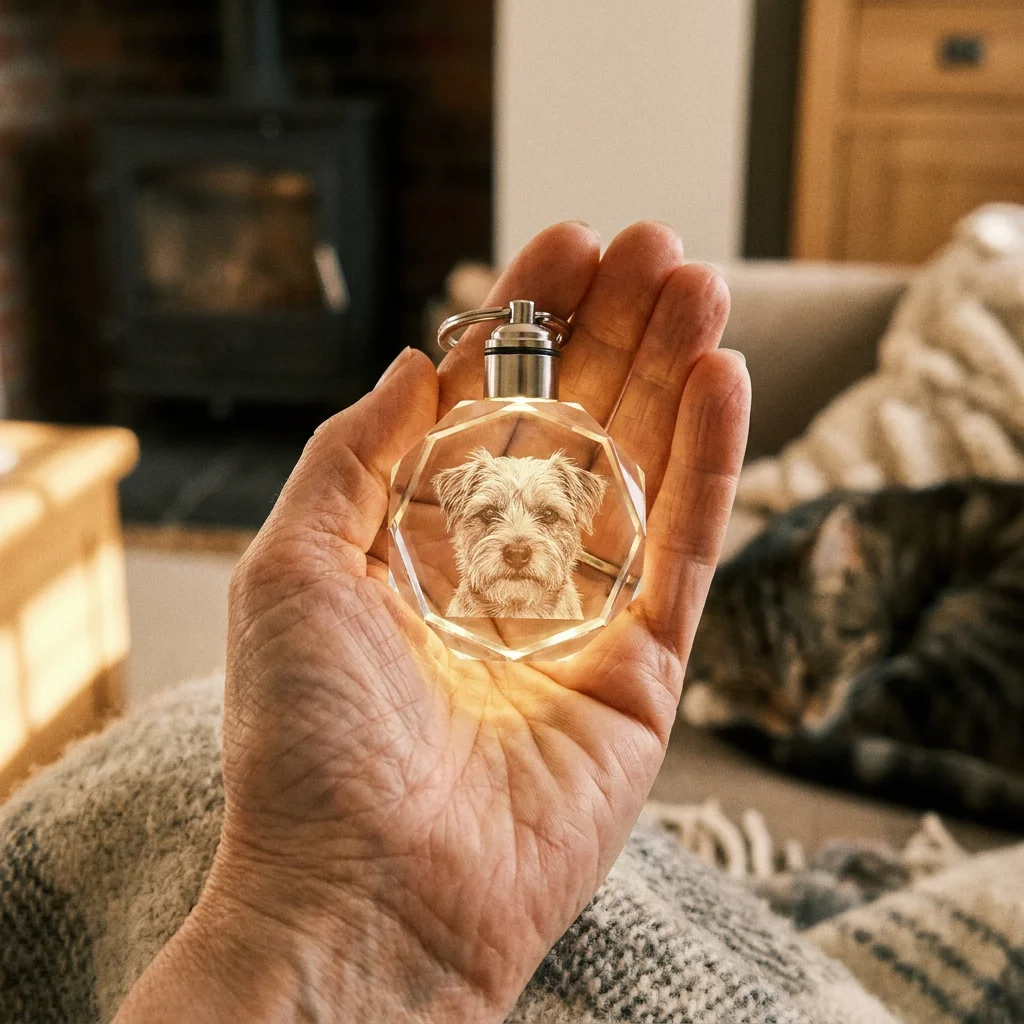
Our advanced sub-surface laser engraving technology doesn’t just print on top of the glass; it etches millions of microscopic dots inside solid, high-grade K9 glass. To translate a flat 2D image into a floating three-dimensional masterpiece, our designers rely on the quality of your upload.
Rule 1: High Resolution is Non-Negotiable
First and foremost, resolution is king. As you choose the perfect photo for a 3D pet crystal, aim for high-resolution images taken directly from a modern smartphone or DSLR camera.
- Avoid Screenshots & Social Media Downloads: Platforms like Facebook, Instagram, and WeChat heavily compress images. A compressed image loses the fine detail of fur textures and whisker patterns, resulting in a less defined engraving.
- Upload the Original File: Always select the “Actual Size” or original image file when uploading. Aim for a file size of at least 1MB to 5MB for optimal engraving clarity.
Rule 2: Prioritize Soft, Natural Lighting
Proper illumination is critical to capturing your pet’s physical depth. When you choose the perfect photo for a 3D pet crystal, look for balanced, natural light that highlights the unique texture of your pet’s coat and the sparkle in their eyes.
- The Magic of Natural Light: Outdoor photos taken on a bright, overcast day or indoors near a large window provide excellent, diffused light. This reveals the subtle contours of your pet’s face.
- Avoid Harsh Shadows & Flash: Extreme shadows cast by direct midday sun or a harsh camera flash can create “black holes” or blown-out highlights. Learn more about professional portrait lighting to understand how light creates dimension. If half of your pet’s face is in pitch darkness, the laser cannot accurately reconstruct the hidden side in 3D.
Rule 3: Eye Level Composition & Clear Contrast
Contrast makes the laser engraving pop. To choose the perfect photo for a 3D pet crystal, select an image where your pet stands out clearly from the background, even though our professional design team will manually remove the background for free.
- Capture the Eyes: The eyes are the window to your pet’s soul. An eye-level portrait where both eyes are clearly visible and sharply in focus ensures that the engraving captures their true expression.
- Clear Contrast: If you have a dark-furred pet, try to avoid photos taken against dark furniture or shadows. High contrast between your pet’s fur and the surrounding space helps our designers map the facial structure with maximum accuracy.
Common Photography Mistakes to Avoid
Even the most powerful lasers cannot recreate details that are missing in the original image. If you choose the perfect photo for a 3D pet crystal that is dark, blurry, or cropped, the resulting keepsake may lose its lifelike impact.
- Motion Blur & Out of Focus: Pets are active, making it easy to capture blurry action shots. Always zoom in on your photo to check if the eyes and nose are perfectly sharp. If they are blurry, the 3D model will appear soft and out of focus.
- Far-Away Group Photos: Capturing your pet running far away on a beach might be a lovely memory, but zooming into a distant subject destroys pixel density. Close-up chest-up or head-shot portraits yield the most spectacular 3D results.
- Cropped Ears or Limbs: If your pet’s ears or chin are cut off by the edge of the photo, they cannot be reconstructed in the crystal. Choose a photo where your pet’s entire head and chest are fully within the frame.
Final Checklist to Choose the Perfect Photo for a 3D Pet Crystal
Before you hit the upload button on PetCrystal3D.com, run your favorite photo through this quick master checklist:
- [ ] Is the original file uploaded (not a screenshot or social media crop)?
- [ ] Are your pet’s eyes sharp, clear, and shining with reflection?
- [ ] Is the lighting soft and balanced across their entire face (no harsh shadows)?
- [ ] Are their ears, chin, and chest fully within the camera frame?
By taking a moment to choose the perfect photo for a 3D pet crystal, you partner with our design team to create a flawless, deeply moving tribute that honors your pet’s memory for generations to come.